


According to Gartner, over 87% of businesses fail to make the most of their data. The primary reasons behind such a low level of business intelligence and analytics maturity are siloed data and the complexity of turning data into useful insights.
Companies find it challenging to utilize their data due to the sheer complexity of managing data pipelines that extract business value from the raw data gathered by the organization. Data pipelines are the basis of every insight extracted from the data, whether it’s simple analytics or ML/AI pipelines; managing high-quality data pipelines is a must. This is where data orchestration can help, bringing you closer to data maturity.
There is a growing number of tools for data orchestration. Let’s examine what this space will be like in 2026 and review the tools teams use today.
Key Takeaways
- Data orchestration centralizes pipeline management: Orchestration tools automate the execution and oversight of data pipelines, improving efficiency and enabling end-to-end visibility across batch, streaming, and ML workflows.
- lakeFS highlights the importance of data versioning: Integrating data version control into orchestration workflows supports reproducibility, rollback, and CI/CD for data, enhancing reliability and auditability across the data lifecycle.
- Reprocessing efficiency benefits from commit-based rollbacks: Instead of rerunning entire pipelines, orchestration systems can reprocess data from specific points (commits), saving compute time and improving agility in scenarios like late data arrival or bug fixes.
- Isolation and atomic promotion enhance data integrity: The ability to run transformations in isolated branches and atomically promote results ensures consistent, error-free updates across complex data lake environments.
- Tooling spans from low-code to code-first platforms: The 2026 landscape features diverse orchestration solutions, ranging from low-code platforms like Shipyard and Kestra to code-centric tools like Airflow, Dagster, and Flyte, each tailored to different team structures and technical needs.
What is data orchestration?
Data practitioners use Data Pipeline Orchestration as a solution to centralize the administration and oversight of end-to-end data pipelines. The process of automating the data pipeline is known as data orchestration. Companies use data orchestration to automate and expedite data-driven decision-making.
What does an orchestrated process look like?
Thanks to the Infrastructure as Code approach, which lets you specify all resources required for a data pipeline, you can wrap entire data operations into a single solution.
For example, you can define not just the pipeline resources that change the data, such as Spark or Trino, but also data storage resources, notification settings, and alarms for those services.
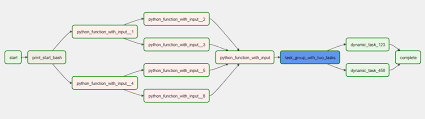
A Directed acyclic graph (DAG) is a graphical representation of your data models and their relationships. Essentially, the DAG is a graphical representation of the data pipeline that the orchestration tool orchestrates. The interfaces of orchestration tools offer an easy way to build, update, duplicate, and monitor the data pipeline through its DAG representation.
17 data orchestration tools teams use in 2026
1. Apache Airflow
Links: Website | Docs | GitHub
What is it?
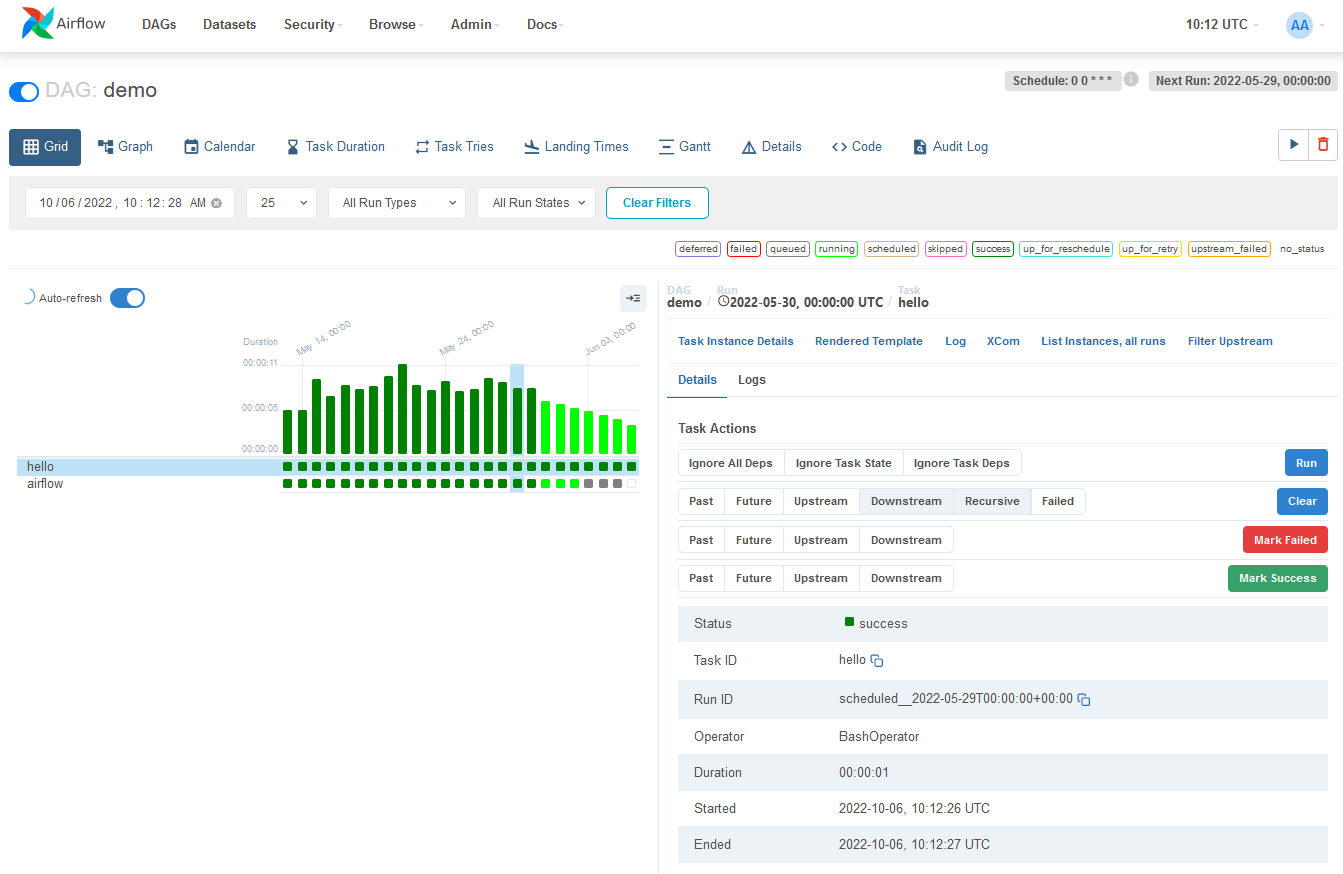
Apache Airflow is an open-source dataflow orchestration tool for authoring, scheduling, and monitoring processes programmatically. It provides a comprehensive collection of operators for a variety of data processing systems, including Hadoop, Spark, and Kubernetes. It also comes with a web-based user interface for organizing and monitoring processes.
What can you do with it?
When specified as code, workflows become more manageable, versionable, testable, and collaborative. This is what Airflow helps with. Teams use it to create workflows as directed acyclic graphs (DAGs) of activities.
The Airflow scheduler runs your tasks on an array of workers while adhering to the requirements you specify. The intuitive user interface makes it simple to see pipelines in production, monitor progress, and fix issues as they arise.
Airflow works well in workflows that are primarily static and change slowly. When the DAG structure is consistent from run to run, it explains the unit of work and ensures continuity. Although Airflow isn’t a streaming solution, it’s frequently used to handle real-time data by extracting data in batches from streams.
2. Astronomer
Links: Website | Docs | GitHub
What is it?
Astronomer makes managing Airflow cost-effective with a managed Airflow service designed to increase developer productivity and data maturity.
What can you do with it?
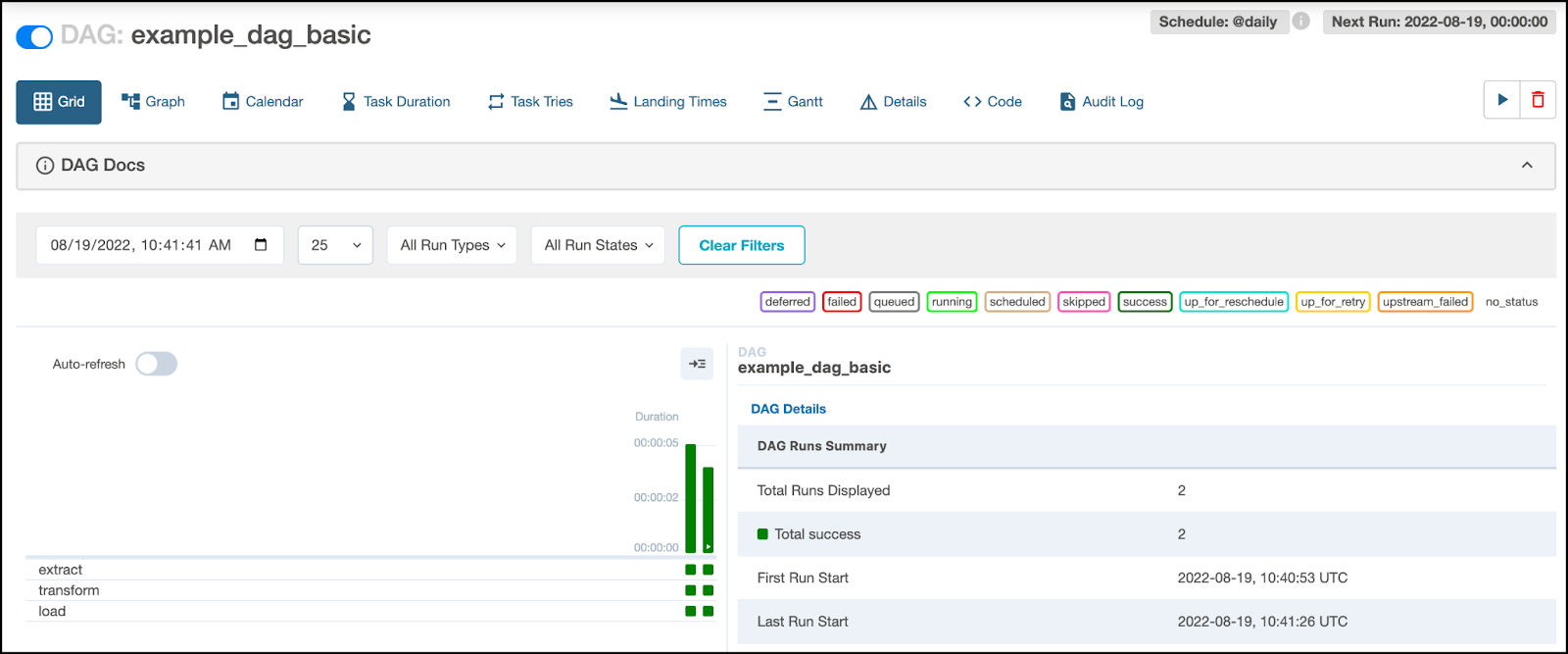
Astronomer has a scheduler that allows you to create Airflow environments and manage DAGs, users, logs, alarms, and version upgrades with a single click. This opens the door to executing DAGs consistently and at scale.
Astronomer also helps engineers write DAGs faster thanks to notebook and command-line interfaces that simplify the process of writing, deploying changes, and automating data testing before it goes live.
The solution also lets you remove technical debt and learn how to push Airflow’s best practices across the organization.
3. Dagster

Links: Website | Docs | GitHub
What is it?
Dagster is a tool that features an intuitive user interface for orchestrating workflows for machine learning, analytics, and ETL (Extract, Transform, Load).
What can you do with it?
It doesn’t matter if you develop your pipelines in Spark, SQL, DBT, or any other framework. You may install the pipeline locally or on Kubernetes using the platform. You can even build your deployment infrastructure.
Dagster will provide you with a single view of pipelines, tables, ML models, and other assets. It offers an asset management tool for tracking workflow outcomes, enabling teams to create customized self-service solutions.
The online interface (Dagit) allows anyone to view and explore generated task items. It alleviates the misery of dependence – since codebases are separated by repository models, one process doesn’t impact another one.
4. Prefect
Links: Website | Docs | GitHub
What is it?
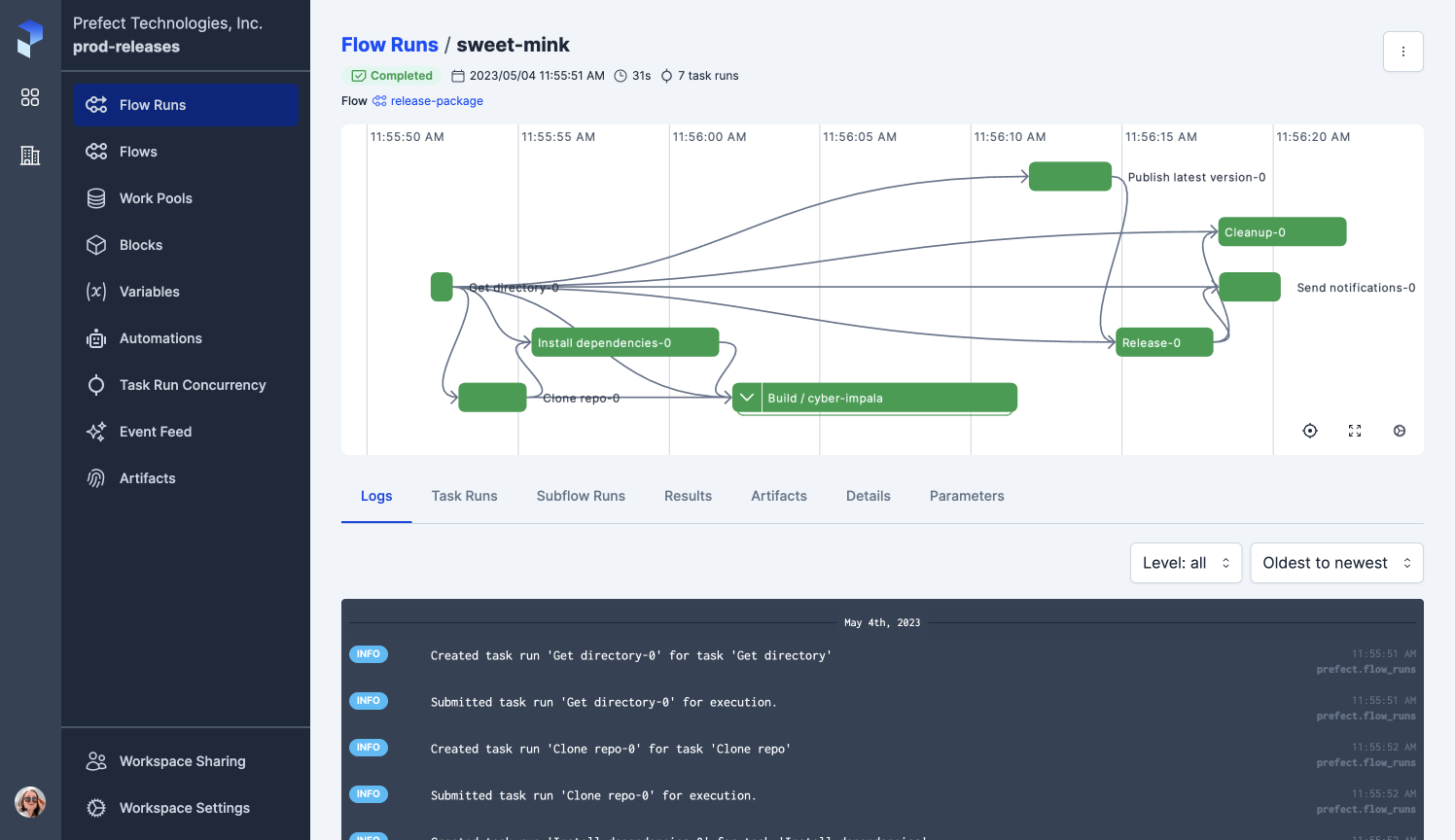
Prefect is an automated workflow management application available built on top of the open-source Prefect Core workflow engine. Prefect Cloud is a fully hosted and ready-to-deploy backend for Prefect Core. Prefect Core’s server is a lightweight, open-source alternative to Prefect Cloud.
What can you do with it?
This workflow management system helps you add semantics to data pipelines, such as retries, logging, dynamic mapping, caching, or failure alerts.
To simplify workflow orchestration, Prefect provides UI backends that automatically augment the Prefect Core engine with the GraphQL API.
With the cloud version, you get features like permissions and authorization, performance upgrades, agent monitoring, secure runtime secrets and parameters, team management, and SLAs. Everything is automated; all you have to do is transform jobs into processes, and the solution will take care of the rest.
5. Mage

Links: Website | Docs | GitHub
What is it?
Mage is a free and open-source data pipeline tool for data transformation and integration.
What can you do with it?
Mage offers a simple development experience for folks who develop in Airflow. You can start programming locally with a single command or use Terraform to establish a dev environment on your cloud.
For maximum flexibility, Mage allows you to write code in Python, SQL, or R in the same data pipeline. Each stage in the pipeline is a separate file that contains reusable, tested code with data validations. No more DAGs filled with spaghetti code!
And you’ll receive feedback immediately in an interactive notebook UI without having to wait for your DAGs to complete testing. On top of that, every code block in your pipeline generates data that can be versioned, partitioned, and cataloged for later use.
6. Luigi
What is it?
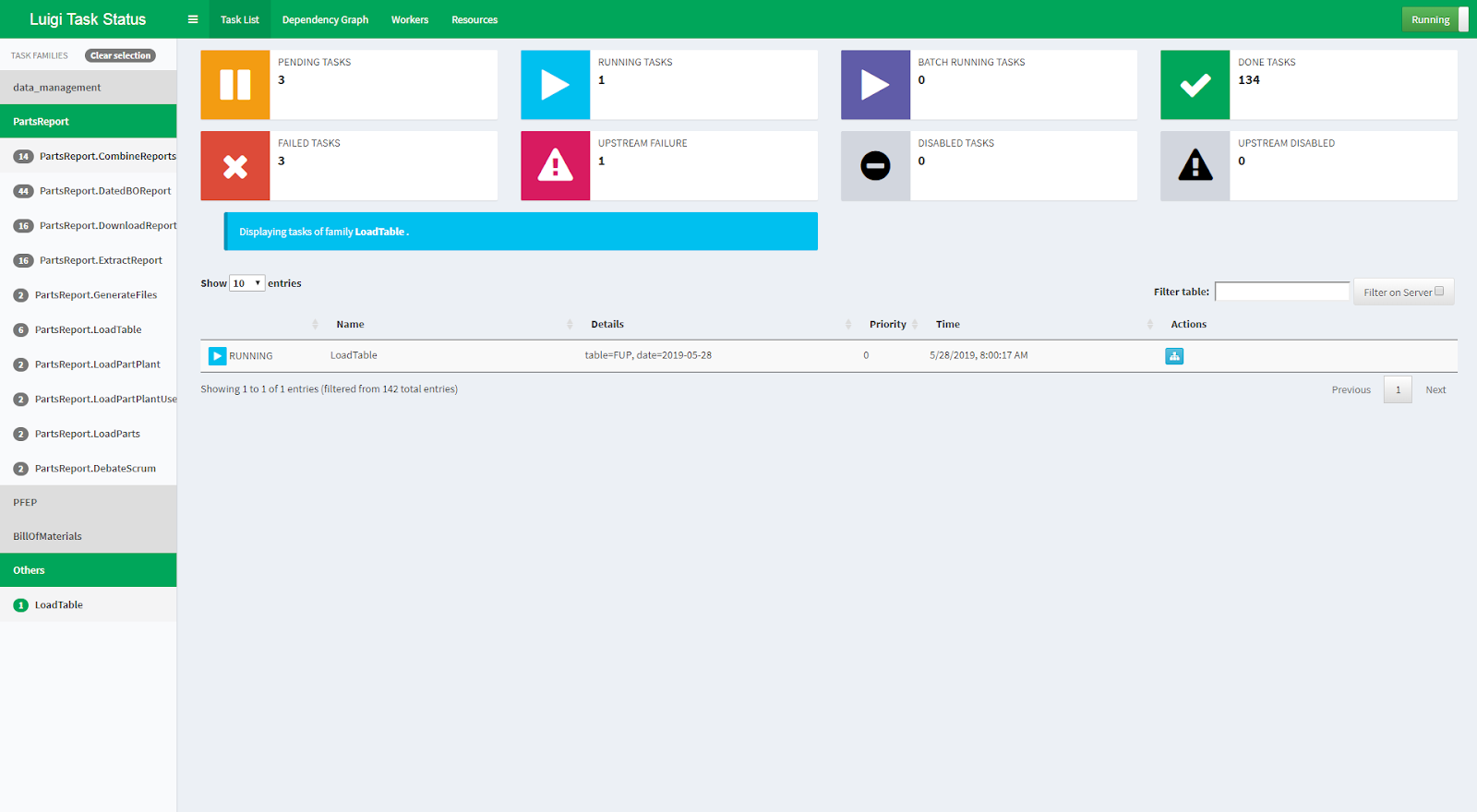
Luigi is a lightweight, open-source Python tool designed for workflow orchestration and batch job execution, great for handling complex pipelines. It provides a variety of services for controlling dependency resolution and workflow management, allowing visualization, error management, and command-line integration.
What can you do with it?
Luigi comes in handy for long-running, sophisticated batch operations. It handles all workflow management tasks that may take a long time to complete, allowing engineers to focus on real jobs and their dependencies. It also comes with a toolkit that includes popular project templates.
All in all, Luigi gives you cutting-edge file system abstractions for HDFS and local files, making all file system operations atomic. If you’re looking for an all-Python solution that handles workflow management for batch task processing, Luigi is the tool for you.
7. Apache Oozie
Links: Website | Docs | GitHub
What is it?
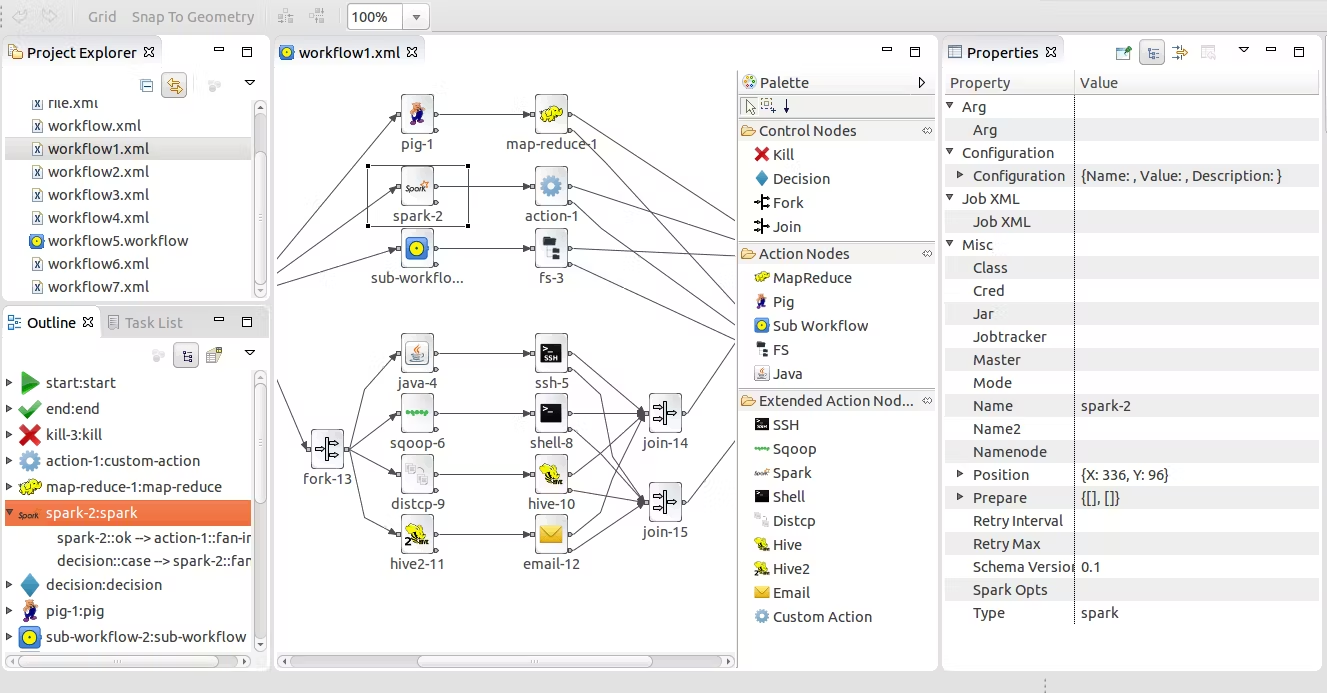
Apache Oozie is an open-source solution that provides several operational functions for a Hadoop cluster, especially cluster task scheduling. It enables cluster managers to construct complicated data transformations from several component activities. This gives you more control over your jobs and makes it easy to repeat them at preset intervals. At its heart, Oozie helps teams get more out of Hadoop.
What can you do with it?
Oozie is basically a Java web application used to manage Apache Hadoop processes. It successively integrates many jobs into a single logical unit of labor.
Oozie is connected with the Hadoop stack, with YARN as its architectural center, and it supports Apache MapReduce, Apache Pig, Apache Hive, and Apache Sqoop jobs. It can also schedule system-specific tasks such as Java applications or shell scripts.
8. Flyte

Links: Website | Docs | GitHub
What is it?
Flyte is a structured programming and distributed processing platform with machine learning and data processing processes that are highly concurrent, scalable, and maintainable.
What can you do with it?
Flyte’s architecture allows you to establish a separate repo, deploy it, and grow it without affecting the rest of the platform. It’s based on Kubernetes and provides portability, scalability, and reliability.
Flyte’s user interface is adaptable, straightforward, and simple to use for various tenants. It offers users parameters, data lineage, and caching to help them organize their processes, as well as ML orchestration tools.
The platform is dynamic and adaptable, with a large range of plugins to help with workflow building and deployment. You can repeat, roll and experiment with workflows – and share them to help the entire team speed up the development process.
9. DAGWorks
Links: Website | Docs | GitHub
What is it?
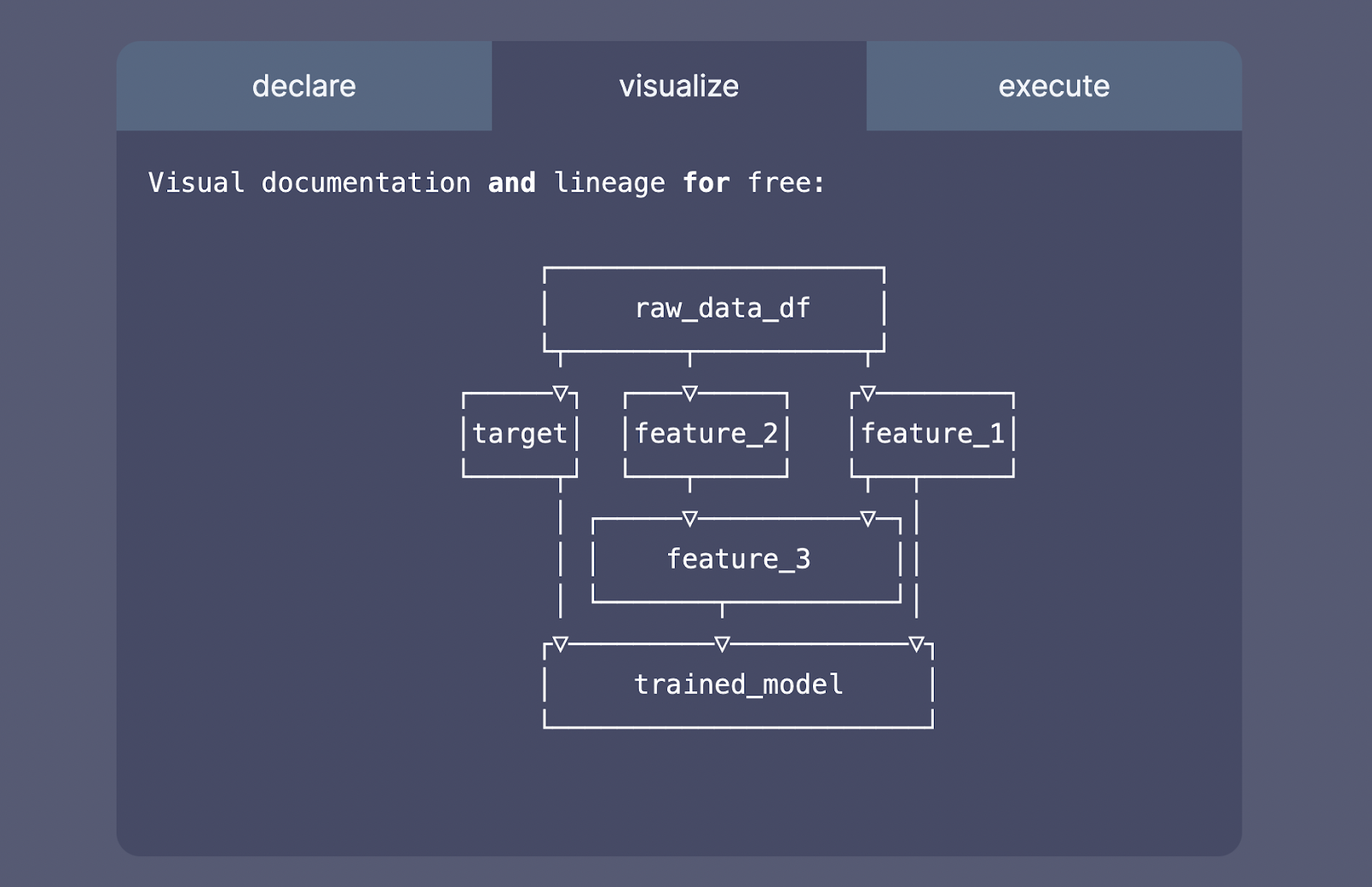
DAGWorks is an open-source SaaS platform that helps companies speed the creation and management of ML ETLs in a collaborative, self-service way, leveraging existing MLOps and data infrastructure.
What can you do with it?
Self-service allows domain modeling specialists to iterate on ML models quickly and without handoff. DAGWorks helps engineers create workflow code and maintain integrations with MLOps tools of their choosing, all in a self-service way.
DAGWorks allows you to easily write unit tests and integration tests and validate your data at runtime. Once done, you can run your dataflow anywhere Python can: batch, streaming, online, etc.
10. Shipyard
Links: Website | Docs | GitHub
What is it?
Shipyard is a platform for data engineers looking to build a robust data infrastructure from the ground up by linking data tools and processes and improving data operations.
What can you do with it?
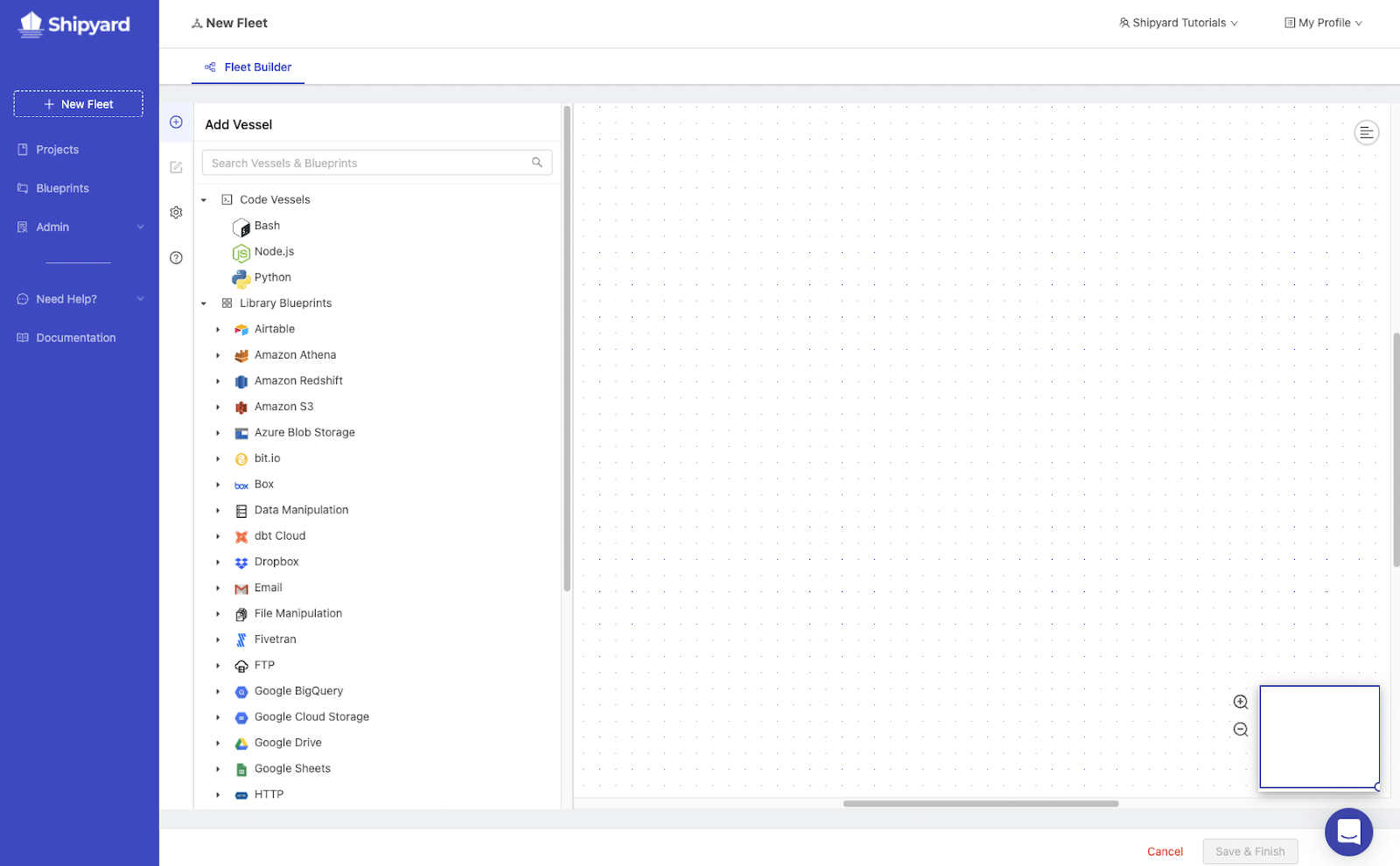
Shipyard provides low-code templates that you can set visually, eliminating the need to write code to design data workflows and allowing you to get your work into production faster. If using current templates isn’t an option, you can always use scripts written in your preferred language to integrate any internal or external procedure into your workflows.
The Shipyard platform incorporates observability and alerting to ensure that business teams spot breakages before they are noticed downstream.
All in all, Shipyard helps data teams do more without relying on other teams or worrying about infrastructure difficulties, while simultaneously guaranteeing that business teams trust the data made accessible to them.
11. Kestra
Links: Website | Docs | GitHub
What is it?
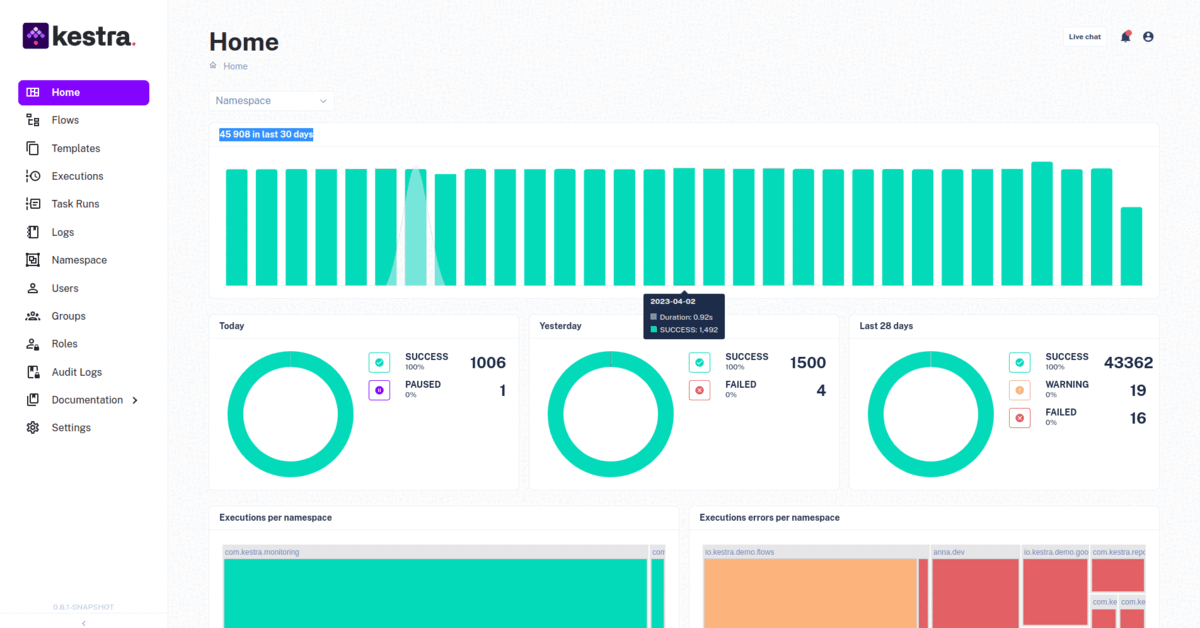
Kestra is an open-source, event-driven orchestrator that fosters communication between developers and business users by simplifying data processes. It enables you to develop dependable processes and maintain them with confidence by integrating Infrastructure as Code best practices into data pipelines.
What can you do with it?
Everyone who stands to benefit from analytics can participate in the data pipeline construction process thanks to the declarative YAML interface for building orchestration logic in Kestra.
When you make modifications to a process using the UI or an API call, the YAML specification is automatically updated. As a result, even if certain workflow components are adjusted in other ways, the orchestration logic is stated declaratively in the code.
12. Datorios
What is it?
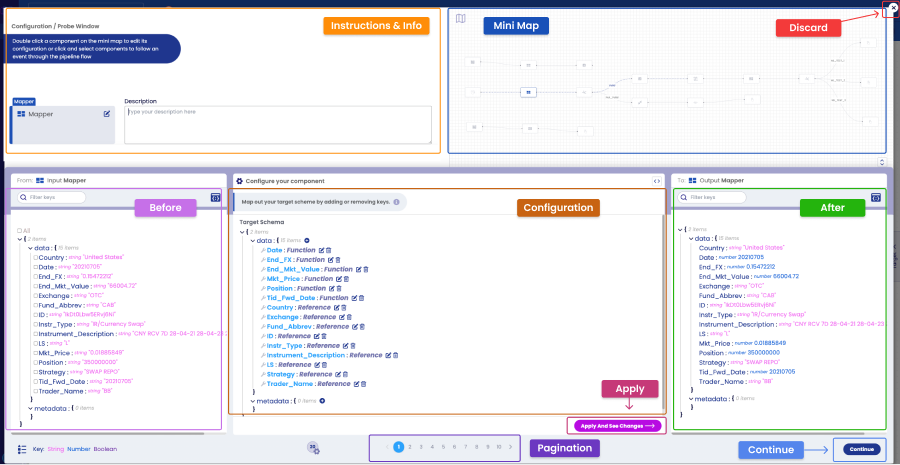
Datorios is a tool that provides engineers with total deployment freedom in a collaborative interface with event-level transparency across all pipelines via in-depth analytics and built-in auto-rectification for rapid feedback loops and hastened outcomes.
What can you do with it?
Datorios offers a collaborative, developer-first interface where you can easily identify and isolate errors in pipeline development. You can also test the impact of changes in real-time and test pipeline components sequentially prior to deployment.
The solution lets you clean, join, or duplicate data from any source. It’s available for cloud and on-premise deployment.
13. MLtwist
Links: Website
What is it?
MLtwist integrates data across disparate data labeling and annotation systems, with the goal of allowing data practitioners to streamline their work and be more productive. The solution has 75+ integrated data labeling systems.
What can you do with it?
MLtwist provides integrations that transfer data assets to the best labeling systems for the job, monitor their performance, and convert the ready annotations into the unique JSON file format required by ML teams.
The benefit of using MLtwist lies in handling all the tasks that go into data labeling operations: developing workflow, testing the correct data labeling platforms, establishing guidelines and training workforces, and quality control. The solution offers a good deal of flexibility, so it’s a good match for practitioners who don’t feel comfortable delegating the entire scope of the job and want to stay involved.
14. Rivery

What is it?
Rivery is a SaaS DataOps platform that provides teams with quick and safe data access. Rivery’s data pipeline and management methodology add automation and actionable logic to standard ETL/ELT operations. The platform also controls the data modeling process, which includes the use of pre-built data model Kits.
What can you do with it?
Rivery is based on the DataOps framework, which automates data intake, transformation, and orchestration. The low-code ETL platform provides several critical features, including pre-built data connections and immediate data model Kits.
Rivery’s pre-built connectors support a wide range of data sources, from typical SFTP connections to Marketo and Zendesk-specific connections. You may use Rivery’s proprietary Rest API to build bespoke data connections and conventional pre-built data connectors.
15. Talend

Links: Website
What is it?
Talend provides a complete portfolio of cloud and on-premises data integration capabilities. Its data orchestration features enable enterprises to automate their data operations, ensuring quality data is supplied across all platforms. Talend is especially useful for organizations that require powerful ETL operations and smooth integration across hybrid systems.
What can you do with it?
The most important features of Talend revolve around data quality management, one of the main use cases. In addition, Talend offers comprehensive pre-built connections and code-free data preparation, making it accessible to users with limited technical skills. Talend also features collaboration tools for teams working together on data-driven projects.
16. Metaflow

What is it?
Metaflow is a human-centric data science platform designed by Netflix to handle real-world data science operations. It streamlines the process of creating and managing machine learning models, emphasizing usability for data scientists and allowing them to iterate quickly. Metaflow abstracts away infrastructure complexity, allowing customers to focus on their data and algorithms while still offering version control, resource management, and deployment capabilities.
What can you do with it?
Metaflow users get to benefit from a user-friendly API for process definitions, as well as integrated data versioning and lineage tracking. The solution is fully compatible with cloud services such as AWS. You can also use Metaflow to automatically scale resources for computationally intensive jobs.
17. Informatica

What is it?
Informatica provides an enterprise-level data management platform with integration, quality, and governance capabilities. Its orchestration features let teams automate activities across several data environments, resulting in a holistic solution for data-driven corporations.
What can you do with it?
Informatica users get comprehensive data integration capabilities, real-time processing and analysis, and collaboration and workflow management tooling. Moreover, Informatica lets you build a scalable architecture for handling high volumes of data.
Data Orchestration Tools Comparison
| Solution | Open source? | Low-code/No-code? | Main use cases |
|---|---|---|---|
| Apache Airflow | Yes | No | Workflow Orchestration Task Monitoring |
| Astronomer | Yes | Yes (via Astro Cloud IDE) | Managed Airflow Service Faster DAG Creation |
| Dagster | Yes | No | Pipeline Orchestration Self-Service Workflow Management |
| Prefect | Yes | No | Automated Workflow Management Cloud Features |
| Mage | Yes | No | Interactive Pipeline Development Version Control & Data Partitioning |
| Luigi | Yes | No | Complex Pipeline Management Command-Line Workflow Execution |
| Apache Oozie | Yes | No | Hadoop Job Scheduling Recurring Data Pipelines |
| Flyte | Yes | No | ML Workflow Orchestration Data Lineage & Caching |
| DAGworks | Yes | No | ML ETL Orchestration Testing & Validation |
| Shipyard | Yes | Yes | Low-Code Workflow Creation Automated Monitoring & Alerts |
| Kestra | Yes | Yes | YAML-based Pipeline Orchestration Event-Driven Orchestration |
| Datorios | No | No | Real-Time Error Detection Collaborative Pipeline Development |
| MLTwist | No | Yes | Data Labeling Automation Workflow Management for Labeling |
| Rivery | No | Yes | Automated Data Pipeline Creation Pre-built Data Connectors |
| Talend | No | Yes | Data Quality Management ETL Operations |
| Metaflow | Yes | Yes | Data Science Workflow Management Automatic Resource Scaling |
| Informatica | No | Yes | Enterprise Data Orchestration Real-Time Data Processing |

Expert Tip: Version Every Pipeline Execution, Not Just Code


Guy has a rich background in software engineering, playing an instrumental role on the lakeFS core team. Their pioneering efforts have reshaped version control technologies, scaling them to manage billions of objects in the Cloud. When he's not coding or spiking a volleyball at the beach, Guy keeps himself busy trying to decipher whether his baby daughter's babble is a secret code.
To ensure reproducibility and rollback safety across your data pipelines, treat every pipeline run as a versioned unit, just like code, by embedding data version control into your orchestration workflows.
- Use lakeFS commits to capture each pipeline step’s inputs and outputs (e.g., Spark inputs dbt outputs) storing run parameters and metadata in commit messages for traceability.
- Use a branch-per-run model in lakeFS for pipelines that modify data in object storage: each DAG run works in an isolated branch, executes transformations, and only merges if alidations pass.
- Leverage lakeFS pre-merge or post-commit hooks to enforce checks like schema drift detection, null count thresholds, or custom quality gates before promoting data.
- Integrate data versioning in orchestration tools like Airflow, Dagster, or Prefect by wrapping API calls in PythonOperators or custom tasks to commit, branch, and merge data programmatically.
How to choose the right orchestration tool?
Choosing the correct data orchestration technology ensures effective data management and processes.
- Identify your needs – Organizations must first determine their specific requirements, such as batch processing, real-time data integration, or machine learning algorithms. Understanding the magnitude and complexity of processes, such as predicted data volume and workflow count helps to reduce the number of options for evaluation.
- Evaluate ease of use – Choose a system with an easy-to-use UI, thorough documentation, and low-code choices to speed up your team’s onboarding and lessen the learning curve.
- Assess compatibility – Compatibility with current infrastructure is also a key consideration. Ensure the solution you want to use connects with your current tech stack, including databases, APIs, cloud environments, and other corporate systems.
- Look for scalability – Organizations should also analyze scalability and identify solutions that can scale with them to guarantee that they can handle increasing demands. Look for capabilities like distributed processing and interoperability with existing technologies like cloud platforms.
- Consider costs – Take budgetary limitations into account, such as licensing and operational expenditures, to ensure that your plans are cost-effective.
- Test the solution – Evaluate the tools’ real-world performance. It provides an opportunity to determine how effectively the tool operates and whether it is appropriate for your context. Understanding how effectively the tool connects with current systems and the user experience it delivers is critical in selecting the right solution for your organization’s goals.
Data versioning is a key part of any data orchestration workflow
In any data orchestration workflow, one critical aspect that cannot be overlooked is data versioning. Data versioning refers to the practice of systematically managing and tracking different versions of data assets throughout the entire data pipeline. It plays a crucial role in ensuring the consistency, reproducibility, and traceability of data-driven processes.
Here are some key benefits of incorporating data versioning into your data orchestration workflow:
- Reproducibility: Data versioning allows you to precisely reproduce and recreate past results by maintaining a record of all the data versions used in a particular analysis or model training. This is essential for auditability, compliance, and debugging purposes.
- Risk Management: Data versioning helps mitigate risks associated with data errors or unexpected changes. If an issue arises at any stage of the pipeline, having a complete history of data versions allows you to identify the problem quickly, immediately rollback to a previous version of the data, and take corrective actions more effectively.
- Reprocessing: Orchestration tools allow you to easily reprocess data by re-executing data pipelines. However, these can be long-running, compute-heavy, expensive pipelines. Therefore, it could be beneficial to reprocess from a specific point of the data pipeline (commit), as opposed to reprocessing the ENTIRE dataset in cases like late arrival data, or bug fixes.
- Isolation & atomicity at the complete data lake level: leveraging the ability to promote data, makes it possible to ensure that all changes to the data lake are performed as a single, consistent unit – i.e. run a long-running ETL in isolation, and only once completed, atomically promote all the changes across multiple tables and data sets.
- CI/CD for data: Data version control system enables efficient and reliable software development practices that are key stepping stones for CI/CD; Enabling data teams to iterate rapidly, collaborate effectively, and deploy data changes with confidence. By implementing best practices, DataOps teams can enable automation that will continuously ensure data quality.
By integrating with the data pipeline, a data version control tool provides a versioning layer for large-scale data sets. It enables data teams to track changes, manage multiple “parallel” versions of the data (branches), and create snapshots of data at different stages of the pipeline.
This capability allows for precise control over data versions, ensuring reproducibility, collaboration, and risk management. This way, data practitioners can easily roll back to previous data states, compare different versions, and accurately reproduce results, thus enhancing the overall reliability of data processing workflows.
Conclusion
Data orchestration tools are suitable for many applications, including large data batch processing and scalable cloud processes. Many variables influence the choice of a data orchestration tool, including the complexity of the data pipelines, the ecosystem’s capabilities, and your company’s needs.


